Building an automated Twitter bot

January 30, 2014

@DrunkBuzzFeed is an semi-automated Twitter bot that I built. I break up a bunch of headlines from Buzzfeed into 3 parts, and put them in a Google Drive spreadsheet. Through a variety of automation services, the headline parts are strung together and tweeted out 9 times a day. Using this guide, you should be able to make something similar (or even identical) yourself. I encourage you to do so.

No coding is required. The only thing you need to have to start this tutorial is a computer running OS X. This tutorial was made using 10.9 Mavericks, but it would probably work with older versions as well. It would be to your benefit if you were able to leave this computer on all the time, with persistent internet access but this (probably?) isn’t required for operation.

Follow this guide, look at the screenshots (click on them to see them full size), and don’t give up. Good luck!

1. Get a new Google account, Make sure Dropbox is installed on your computer, get a new Twitter account.

Click here to sign up for a new Google account. It doesn’t really matter what you call it. Don’t use a Google account you already have.

If you’ve already got a Dropbox account and the Dropbox OS X app is already installed on your computer, move along to the next paragraph. If you don’t already have a Dropbox account (what’s wrong with you?), click here to sign up for one. If you don’t have the app installed on your computer, go here and install it.

Finally, sign up for a new Twitter account. This will be where your automated tweets are posted from. Sign up with the email address you just created to keep things straight.

2. Collect content

For @DrunkBuzzFeed, the content is made up of parts of Buzzfeed headlines. Since I hate Buzzfeed, I didn’t want to go there and collect the content myself, so I made the automator service IFTTT (If This Then That) do it.

Even if your content isn’t Buzzfeed headlines, sign up for an account because you’ll need it later. If you already have an account, it’s fine to use that one.

IFTTT calls their automations “recipes”. I made a set of recipes that collect new headlines from every Buzzfeed category, and puts them in the same Google Drive document. You’ll have to connect your Google Drive to your IFTTT to use this recipe, but they’ll walk you through that.

Here’s a sample recipe. I made one of these for each Buzzfeed headline category, but they all end up in the same document.

3. Break up content

IMAGE1

When I’m ready to add new content to @DrunkBuzzFeed, I select all the headlines (command+a), cut them (command+x) and paste them (command+v) into a new TextEdit document. TextEdit’s a program that’s already on your computer.

Once I’ve got the contents pasted into TextEdit, I turn the document into plain text (command+shift+t) but that’s personal preference. Then I start breaking the content up with the tab key. I break each headline into 3 parts, so that means I’ll put 2 tab breaks in each headline. It should look something like this:

IMAGE2

Once you get everything set up, this step and the next one will be the only thing you do to keep your bot fresh. It’s also the only place you have any kind of creative control. Have some fun with it!

4. Input content

Copy all of your newly separated headlines (command+a, command+c). Head back to Google Drive, and make a new spreadsheet. Name it something you’ll remember

On Sheet 2 (trust me) of your spreadsheet, paste (command+v) all of your headlines. BAM! All your Tabs have turned into new cells.

IMAGE3

5. Randomize content to create a piece of new content

So now you’ve got all the parts in place, and here’s where the real automation magic comes into play. For ease of organization, make a Sheet 3, and do this step there.

Next, Follow this guide which does a great job of explaining spreadsheet formulas. Change things as they apply to you. Here’s what mine looks like
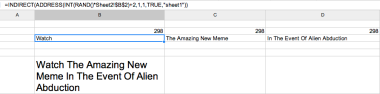
IMAGE4

As you can see, @DrunkBuzzFeed is chosen from 3 columns of 298 choices. That gives it a possible output over 25,000,000 tweets, assuming each cell was unique.

At this point, you should have a cell that puts together 1 choice from each column, forming something new in a single cell. Now, make Sheet 4 and make cell A1 point to that end product. It might be something like “=Sheet3!A3”. If you’re doing it right, it should display the same thing as your end product on Sheet 3. This is what mine looks like:
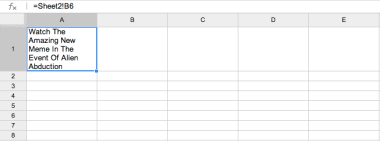
IMAGE5

6. Get the tweet out of Google Drive and format it

A couple last things before we can get out of Google Drive. First, make your spreadsheet public. I don’t know 100% if this is necessary, but you’re going to be calling on it from another service later, so it can’t hurt. To do this, click the blue “share” button at the top left of the window, and select this option:

IMAGE6

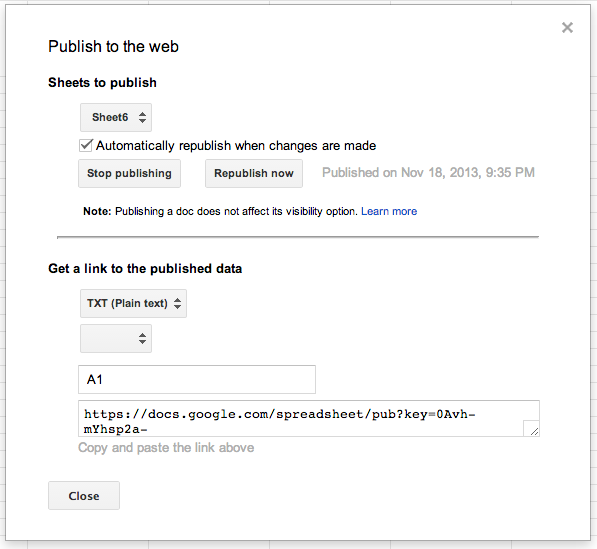
Finally, in your spreadsheet, go to File > Publish To Web. For your settings, if you’ve followed all my advice, “Sheets to Publish” should be set to Sheet 4, Automatically Republish when changes are made should be checked, Get a link to published data should be “TXT (Plain Text)” and your cells should be set to A1. I didn’t follow all my advise, so here’s what mine looks like:
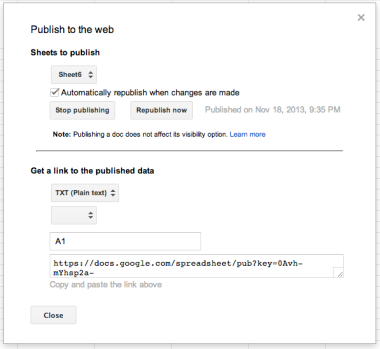
IMAGE7

Copy and paste that link at the bottom into a new browser window. You should also save it somewhere for later. If you’ve done your job right, SpreadSheetName.tsv should download. Here, try mine. Open that with text edit, and it should be one line that’s a combination of 3 Buzzfeed headlines. Now how do you turn that into a Tweet? This is the part that had me stumped for the longest time. We’re going to turn to an OS X app you’ve probably never used before called Automator. It should be in your Applications folder. If you can’t find it, bring up spotlight (command+space) and search for it.

Open Automator, and navigate to File > New > Application. Yeah, you’re making your own application. Heads up: we’re going to be using the app’s search bar a lot to work quickly. We’re going to do 5 easy tasks.

Task 1: Get Specified URL

Find the “Get Specified URL” task with the search bar. Make the only URL in there the one that comes from your Google Drive spreadsheet. It should look like this

IMAGE8

Task 2: Download URLs

This is going to allow you to save that file into a folder of your choosing. The folder you choose should in your public Dropbox folder, and should be used only for this purpose. Here’s what mine looks like:
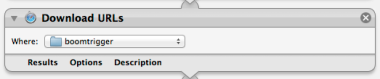
IMAGE9

Tasks 3, 4 & 5: Rename Finder Items: Add Date or Time

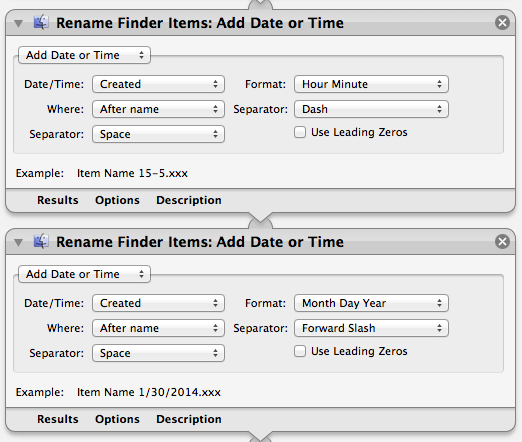
Now, we want to make sure each file has a unique name by date stamping it. First, we’re going to rename the finder item as such: Add date or time > Created > Hour Minute > After name > Dash > Space. Then we’re going to rename the finder item Add Date or Time > Created > Month Day Year > After Name > Forward Slash > Space. These two tasks should look like this:
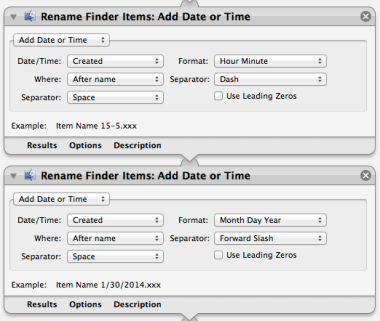
IMAGE10

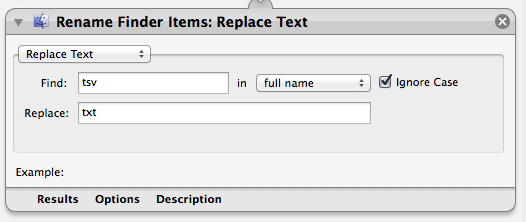
The last Rename Finder Items tab is to change the file extension. So it will go Replace Text > Find tsv in > Full Name (ignore case checked) > Replace: txt. Mine looks like this
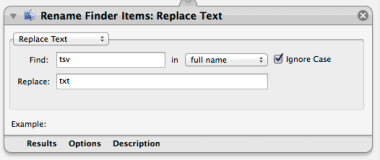
IMAGE11

Now, run it. Ignore the warning. You should see 6 green checkmarks at the bottom that everything has run correctly. And if you navigate to your specified folder, you should have a new file:

IMAGE12

Save your file as something you’ll remember in the same folder that your tweets will be outputting to. Close Automator. Double click on your new application, and ignore any warnings and let it run. The file should create itself without Automator opening at this point.

7. Make tweet readable by IFTTT

IFTTT is the program we’re eventually going to use to send the Tweet, but it can’t read the content of plain text documents. Fortunately, there’s another Automator service called Zapier that can. You probably don’t have a Zapier account, so create one here.

Now, Zapier COULD turn this .txt file into a tweet ALL BY ITSELF in 1 step, BUT we’re not going to go that route. You see, Zapier only allows 100 free actions a month, and so we limit the load on Zapier and put as much of it as possible on IFTTT which allows unlimited free actions a month.

For @DrunkBuzzFeed which sends 9 tweets a day (around 270 a month), I have 3 different Zapier accounts do the work to keep it free for me. With 1 Zapier account, you can do up to 3 a day every month.

The only service you need to connect to your Zapier account is Dropbox. Do so. Then we’re going to create a new Zap. (Zapier Zaps = IFTTT Recipes). My Zap can be found here, but I’ll walk you through how to make your own.

Click “Make A Zap” and make both your trigger and action services Dropbox. Make the trigger “New File In Directory” and make the Action “Create New Text File”. Click “continue” and use the same dropbox account for both your trigger and your action.

For “Only trigger a “New File in Directory” from Dropbox when…” go choose your directory and make it where you just made your Automator task. This is a dumb process and it takes a long time to drill it down. Be patient. Don’t add any custom filters, just click “continue”

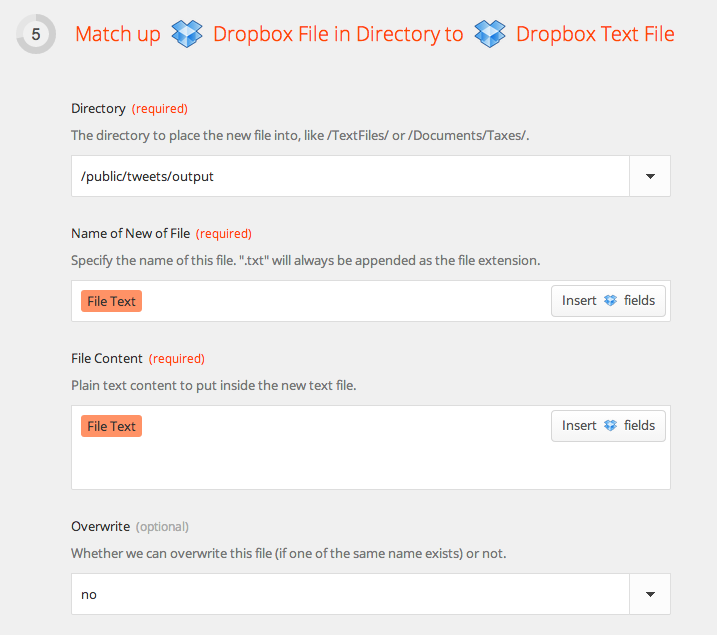
Now have it output to A DIFFERENT FOLDER. Make one in your Dropbox Public folder first in Finder, then drill down again just like you did last time to find it.

For “Name of New File” insert “File Text”. You can do the same for File Content. It should look like this:
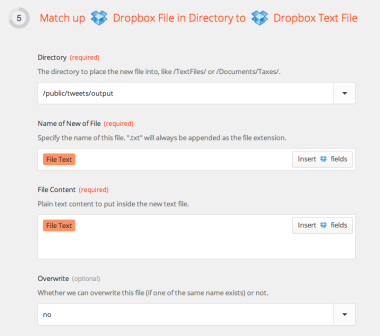
IMAGE13

Test it. You should end up with a new file in your output dropbox folder that’s called “(whatever the body of your old document used to be).txt”. Deep breath. We’re almost there.

8. Send the Tweet

We’re heading back to IFTTT for steps 8 and 9. This first one is going to take your output from Zapier and send it to Twitter. You’ll need to connect your Dropbox and Twitter accounts, but it will walk you through that. Here’s the recipe I used, but I’ll show you how to make it on your own .

Click create, then: If > Dropbox > New File In Your Public Folder > Subfolder Name wherever you have your Zapier output going > Then > Twitter > Post A Tweet > FileNameNoExt… and that’s it. You’re now to a point where if you run the Automator application you created, within 30 minutes, a tweet will show up. I say within 30 minutes, because Zapier and IFTTT aren’t checking all the time, they do it on 15 or so minute intervals. We’re not done with IFTTT yet though!

9. Make New Tweets

We can’t just send the same tweet over and over again. Fortunately, you may have noticed, your randomly generated tweet changes every time you make a change to the spreadsheet. And fortunately, IFTTT can make changes to the spreadsheet for you! Here’s my recipe that does that, but once again I’ll walk you through it.

If > Date and Time > Every Hour At > Doesn’t Matter Minutes Past the Hour > Then > Google Drive > Add Row to Spread Sheet > Spreadsheet Name “Whatever you called your spreadsheet all the way back in step 4” > Put anything in the row. It doesn’t matter what you put, just something> Get rid of Drive Folder Path if it’s in your main Drive folder and Create Action.

Now you’ll be generating a new thing every hour, whether you use it or not.

10. Schedule Tweets to run forever

You don’t want to have to run your application every time you want a new tweet published. This last step will allow you to schedule them forever, so they’ll run when you’re away from your computer (if you’re computer’s on), or while you’re at your computer and you don’t want to think about sending new tweets

Open up Calendar for OS X. Go to File > New Calendar > On My Mac. Call it “Tweet Schedule” or whatever you want.

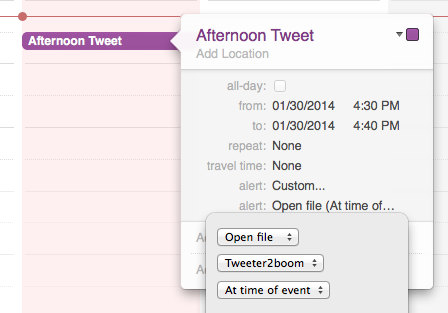
Right click on a time that’s like 15 minutes from now. Make a “New Event” Make sure your new event is on the calendar “Tweet Schedule” Call the event whatever you want. Make the event time short, maybe 10 minutes long. Set Alert > Custom > Open file > THE APP YOU MADE” Make it repeat every day, if you want. It should look like this: (but with Repeat on “every day”)
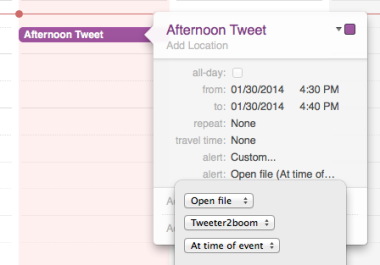
IMAGE14

Now… wait for the event time. When it comes, your app will run in the background. You won’t see it. What you should see is a new file in your designated Dropbox folder. In 15 minutes or less, Zapier will take that file and rename it. 15 minutes or less after that, IFTTT will take that renamed file and tweet it. If you set this calendar event to repeat every day, you’ve created an automated twitter bot!

With 1 free Zapier account, you can send 3 tweets/day. Create 2 other additional recurring events. For every additional Zapier account you make, you’ll be able to schedule 3 more tweets/day, but you’ll have to duplicate your Automator setup into a new folder. And if everything works, that’s it!

Tips, tricks and thanks

  • Automator uses Safari, and for whatever reason you need to be logged in to a Google account (any Google account) on Safari for your app to work. Every 2 weeks or so, Safari/Google will sign you out of your account, and you’ll have to sign back in for your tweets to start working again.
  • Clean out your Google Document collecting new headlines and your Google Spreadsheet that IFTTT is adding to. Do this somewhat regularly (weekly?. They get unruly when they are too large.
  • I hate Buzzfeed so much
  • Thanks to @CameronBanga who also hates Buzzfeed for helping me come up with this idea. I wouldn’t have done it without him.
  • Please if this guide has helped you out at all, contact me on Twitter @mangosquash and let me know. I’ll also answer questions there. Also, I’d love it if you followed my bot. I think the results are funny


  • Top 10 Albums – 2013

    January 18, 2014

    4 years in the same location. This is certainly a new record for my top 10 list, and though this blog has been neglected/abandoned this year, it’s nice to have everything in the same place.

    I had a great year listening to music this year, and still believe in the album as the best way to listen to music. Perhaps the fact that I’m saying that though indicates that I don’t really believe it. Who knows? In 2012, 7 artists were new to my top 10 list, and this year that number is down to 4.

    I had a wild ride through October and November where I was seeing about a concert a week, but despite that fact, I only saw 4 bands that made the top 10 list live this year.

    It’s been a tradition that I’ve provided download zips for past top 10 lists… but I’m not going to this year. If you’d like to hear the album, you can click on the Spotify link, or find it on YouTube or whatever. If you can’t figure out a way to listen to the album, get in touch. Without further ado, here we go!

    10. Tim Kasher – Adult Film

    Tim Kasher had an incredible run 2000-2004 chugging away as Conor Oberst’s second fiddle on the Omaha scene. Tim Kasher released 5 albums and a couple EPs over this period of time, and some of them are among my favorite albums ever. Specifically, Cursive’s Domestica and The Good Life’s Album of the Year.

    I’ve kept up with his work with varying degrees of interest since that time, but I hadn’t really gotten into an album since this one. Adult Film is more Good Life than Cursive, but it still rocks pretty hard. Standout tracks: A Raincloud is a Raincloud, Truly freaking out.
    Listen on Spotify

    9. of Montreal – Lousy with Sylvianbriar

    of Montreal’s another band who I was into for a long time. Unlike Kasher’s music, which I thought got kind of boring, of Montreal’s music just got too weird for me, and I lost interest.

    With Lousy with Slyvianbriar, of Montreal takes a sharp left turn from their hyper-sexualized-pschadelic-disco-pop and basically makes an accoustic country album. This isn’t too crazy, as they started out as a more acoustic pop band, but it’s pretty unexpected twist, and it works out pretty well. But it’s still pretty weird. Standout tracks include: Triumph of Disintegration, Belle Grade Missionaries
    Listen on Spotify

    8. Fur Trade – Don’t Get Heavy

    So, here’s a new band, but a sound you might recognize. Fur Trade is a side project of Steve Bays of Hot Hot Heat (Who’m you’ve probably heard of) and Parker Bossley of the Gay Nineties (Who’m you might not have heard of. I haven’t.) Now, I’ve never listened to a Hot Hot Heat album, so I wasn’t expecting much when I grabbed this one.

    But hey, it’s good, maybe even really good. This album is one of two that falls into my annual category of “Who’s going to make a better Islands album than Islands?” (The next answer is #7)

    This album is a rocking good time. The album starts out with a really strong 1-2 punch, so check those two out: Don’t Get Heavy and Kids These Days
    Listen on Spotify

    7. The Little Ones – The Dawn Sang Along

    I literally don’t know anything about this band. They weren’t reviewed on Pitchfork, and the people who formed the band were a part of Sunday’s Best, another band I’ve never heard of. I probably stumbled across this CD when it was on a torrenting site’s top 10 and had the tags “indie, pop, rock”. Those are all things I like

    And it turns out this album is really good. Those tags are pretty good indicators of what you’re in for. It’s a great pop rock album. It’s got good beats throughout. I think maybe on this list, it might be #2 or #3 on an “appealable to the largest amount of people” ranking.

    Check out tracks: Argonauts and Little Souls
    Listen on Spotify

    6. Kanye West – Yeezus

    Hating Kanye West appears to be back in style and stronger than ever in 2013, and I won’t deny that he makes it pretty easy. He says dumb things in interviews, he marries weird people, etc… I understand if you don’t like Kanye West.

    But he is doing real work, musically. His previous full-length, 2010’s My Beautiful Dark Twisted Fantasy, was my favorite album of the year, and I just listened to it again this week. It’s incredible. This album is not that good, by a long shot, but it’s also wildly different.

    I still haven’t got on board with this IDM or whatever the kids are calling it these days, but Kanye’s keeping up with the times. He’s built a huge platform for himself and he’s not sitting on his ass making Graduation over and over again, raking in more money. He’s doing interesting things. He’s setting himself up over and over again for criticism and failure, and (at least musically) he keeps succeeding.

    This album took awhile to grow on me. Maybe 3 times through I was still unsure about it, but it’s strong all the way through from the schyzophrenic “On Site” to the topless Kim Kardashian “Bound 2”. There’s a reason that artists as diverse as Justin Vernon (Bon Iver), Daft Punk and Rick Rubin want to work with this guy. No matter how misguided you might think he is, he cares passionately (often to a fault) about the work he’s doing, and will go to whatever ends he deems necessary to get it done.
    Listen on Spotify

    5. Okkervil River – The Silver Gymnasium

    Unlike Tim Kasher and of Montreal, where I kind of lost interest for awhile, I’ve given all of Okkervil River’s albums a good hard effort, and things have been in decline (on my estimation which is obviously of little consequence) since Black Sheep Boy, which capped a string of 3 phenomenal albums. Both Stage Names and Stand-Ins (which maybe doesn’t count as an album?) were both pretty good.

    2011’s I Am Very Far was decidedly average though and after seeing a decidedly below average show in support of the album, I was worried my Okkervil River days were nearly over.

    This album is very good though. Not BSB good, but at least Stage Names good, and the St. Louis tour date was decidedly great. This is a concept album about a boyhood in New Hampshire in the 1980’s, and if that sounds too quaint to you… it might be. But if you think “oh that might be interesting” then you’ll probably like this album.

    Looking at the track list, it’s hard to recommend just a few tracks here, but let’s see how you like: On A Balcony, Down The Deep River & Pink Slips
    Listen on Spotify

    4. Tristen – Caves

    You might remember Tristen from her #6 appearance on the 2011 list with Charlaten at the Garden Gates. This follow album seemed to take a long time to get out. Maybe I only think that because I backed it on Kickstarter.

    But anyway, Charlaten was a very nashvill-y album, and this one is too. But there are more drum machines. I don’t have a lot to say about this, other than I love her voice and I think you will too. Check out the tracks “No One’s Gonna Know” and … I don’t know “Monster”. They are all good though.
    Listen on Spotify

    3. CHVRCHES – The Bones of What You Believe

    This one took a lonnnnggggg time to grow on me. There are discussions on record of me not liking this album. I still stand by the fact that CHVRCHES is a stupid band name, but I can no longer say that this is not one of my favorite CDs of the year.

    This is an electronic pop album. Listen if you like “The Postal Service”, maybe? But it’s definitely less minimal than that. It’s big, it’s fun, and it might be just as good. This is solid stay awake, multiple listen road trip material.

    Check out “The Mother We Share”, “Gun”, “Recover”, and then be confident that if you listen a few times, the rest of the album is as good as these three tracks.
    Listen on Spotify

    2. Vampire Weekend – Modern Vampires of the City

    I keep waiting for this band to disappoint me. Their debut seemed like such a flash in the pan, their second album seemed like an acceptable continuation of their first album, but what about that third album? They have to get worse, or get boring, right?

    WRONG. Modern Vampires of the City is as good as Vampire Weekend’s debut, and it is completely different. Sure, it’s still kind of ivy-league pop-rock. But they strayed well out of their comfort zone here, most notably by writing some great slow songs. I can’t and won’t say what my favorite Vampire Weekend album is, but this is definitely in the conversation. Also, it gives me hope that this band has a lot more potential than I thought they did.

    Every track is great, but I guess check out “Dianne Young”, and “Everlasting Arms”. My favorite track though, is “Hannah Hunt”, but it’s a bit of a grower
    Listen on Spotify

    1. Moonface – Julia With Blue Jeans On

    If Spencer Krug is putting out an album, under any name there’s a good chance it’s going to show up on a Top 10 list for me. (Except for those Wolf Parade albums after the first one. Don’t know what went wrong there.) Moonface has been an amorphous project with the only fixed piece being Spencer Krug himself, and this one is the most concentrated form of this vision: Spencer Krug, his voice, and a piano.

    It’s easily my favorite Moonface album and maybe up there with my favorite Spencer Krug album under any name. (Sunset Rubdown was his other main band. They only put out 3 albums but all of them were close to my #1 album of the year when they came out.)

    If this album were by anyone else, it might not have made such an impact on me, but I just love this guy’s voice and his style of writing so much. I guess standout tracks include: “Love the House You’re In” and “Black is Back In Style”.

    To be clear, these top 3 albums were kind of a tossup. In a tossup though, Spencer Krug always wins for me.
    Listen on Spotify

    Thanks for reading. See you again in 2015.


    iPods v. Amazon

    January 29, 2013

    I’m almost certain that if Apple only made iPods, they’d still have more profit than Amazon over their most recent reported quarters.

    Here’s some rough guessing math. In Apple’s most recent quarter, they made $13.1b in profit on $54.5 B in revenue. That’s a total operating profit margin of 24%. According to their numbers, they sold 12.7m iPods resulting in $2.143b in revenue. That’s an average of $1.68.74/iPod.

    If the iPod carries a 24% profit margin (which I don’t think is unreasonable), that would mean Apple made $514.32m in profit on the iPod last quarter.

    Amazon posted $405m in operating income last quarter and $97m in “net income gain”. I’m not sure what those numbers mean, but for Apple to match them with iPod profit, it’s margins would have to be 18.8% and 4.5% respectively.

    So, in terms of profit, I think it’s pretty safe to say that the iPod had a better quarter than Amazon.


    St. Louis Diner Review: Jeff Mangum

    January 25, 2013

    I went to see Jeff Mangum with my father last week. He blogged about it, and I like it, so I’m not going to write much about it.

    Jeff Mangum at The Sheldon

    We were in the balcony but about 40 people came up and either sat right in front or actually sat on the stage with him. it was cool. And all of them knew the words… to every song. I remember being a fan like that and having a passion like that. but barely.


    Ladies & Gentlemen: Harry Marks

    January 24, 2013

    “I Will Not Fix Your Computer”

    Do you own a Mac? Is it under warranty? Take it to the Genius Bar.

    Do you own a Windows PC? Your Google search is as good as mine.

    Ahh! I love this so much. Read the whole thing.


    Naysaying everything I create

    January 22, 2013

    Screen Shot 2013-01-22 at 3.05.28 PM
    Tomorrow should be an interesting day for Apple Doom & Gloom pundits.

    If Verizon’s #s are any indication, the iPhone had a gangbusters quarter… and from everything I’ve seen, Verizon HATES selling iPhones.


    Do You Know ‘X’ on Twitter?

    January 21, 2013

    Do You Know SHUT UP On Twitter?

    I love Twitter, but Twitter doesn’t love me back. I’ve got lots of Twitter accounts attached to lots of email addresses: @mangosquash, @boomreactive, @bathtubtuna, @innuendolympics, @beckerwedding, @kubeklassik, @henrymeoww, etc… Most of these are single-event or novelty twitter accounts that I don’t maintain or tweet from, but I like having them.

    Here’s what I don’t like: Getting hundreds of stupid emails from Twitter for no reason. I swear that I deselect all of the email boxes every time I sign up for a new Twitter profile, especially the ones in the “Updates from Twitter” section. But somehow, when I go back into these accounts, some boxes are checked. How does this happen?

    My best guess (and It’s just a guess) is that sometimes they add options and you’re opted into them automatically. You then have to log into Twitter.com (something I try never to do) and opt out. When you’ve got 7 accounts, this process is kind of daunting – I understand that this is my fault, but it’s not something I think I should have to do.

    The worst kind of email I get on a weekly basis from almost all of my accounts are “Do you know ‘X’ on Twitter?”

    Think about that sentence. What does that mean? If I knew someone, I would know them. I wouldn’t know them on Twitter. If I had met someone through Twitter and that was my only point of reference with that person, I’d know them through Twitter. I wouldn’t know them on Twitter. Either I know someone or I don’t. Twitter has nothing to do with it. AND If I accept the terminology and I know someone on Twitter I’d already be following them.

    After the subject line, it posits “Some people you may know on Twitter” which is still nonsense. What they mean here is “Some people you may know who are on Twitter”

    Here are some better suggestions for subject lines:
    Do you know ‘X’? They’re on Twitter!
    ‘X’: some Twitter users we think you might know
    Follow your friends: Do you know ‘X’?

    Or better yet, just stop sending me these emails.


    Top 10 Albums – 2012

    January 17, 2013

    Now that I’ve got 3 top 10 lists (2010, 2011 and this one) all in one place, I can say without doubt that this is the latest I’ve published my top 10 since 2009 (I’ve found my 2009 post on Tumblr, but all it gives me is a vague “3 years ago). So I’m late and I’ve no excuse.

    Anyway, listened to a lot of new music from a lot of artists I wasn’t familiar with this year. 7/10 artists on the top 10 list are making their first appearance on a Jon Becker top 10 list, though many of them have A) been around for awhile or B) Are a permutation of another band who’s made the list. Even though I’ve listened to a lot of music this year, I’m not sure this is my strongest list. My writing of the list is especially weak. It is what it is.

    Wanna download it? Click the images to go to the download link.
    The host I’m using doesn’t seem to like my files. Will look for a solution Don’t all you kids just use Spotify these days anyway? Here we go:

    10. Divine Fits – A Thing Called Divine Fits


    The Divine Fits (fronted by Wolf Parade/Handsom Furs Dan Boeckner and Spoon’s Britt Daniel) had so much promise for me. I love Dan Boeckner’s Handsom Furs, and I love the way Spoon sounds (and certain Spoon songs). These two seemed destined to make a fantastic album together. I loved the teaser song for the album, “My Love Is Real”, and then the album came out, and that was my favorite song on the album.

    A Thing Called Divine Fits pretty much has the feel of a Spoon album with Boeckner singing half of the tracks and adding his synth parts. It’s good, but it isn’t as good as I wanted it to be. The cover of Nick Cave’s “Shivers” though is top notch, and got me to listen to the original version.

    9. Shearwater – Aminal Joy


    Shearwater is fronted by Jonathan Meiburg, once a member of Okkervil River. This is my favorite CD of this band. In a 1 word description, I’d say this band is pretty. The vocals are pretty, the arrangement is pretty and the songs are pretty, but maybe to a fault? I think that this album has the best songs and it’s the first album of theirs that has been able to captivate me.

    8. Moonface – Heartbreaking Bravery


    If you’ve been following this list, you may know how much I love Spencer Krug (Wolf Parade, Sunset Rubdown, Moonface [in order chronologically, not by my preference of his projects]). If you asked me my favorite musician, I’d probably say “Spencer Krug”. This CD is lacking in gripping content however. I really liked it, but I’m not so sure how fit it is for general consumption.

    7. The Mountain Goats – Transcedental Youth


    Songwriter extrodinaire & my favorite liberal tweeter John Darnielle is at it again. This may be my favorite Mountain Goats album since Get Lonely, which was the album that got me into the band. You should get this album, and you should get all other Mountain Goats albums. He is an incredible songwriter, writer, and thinker. He also might be a little crazy.

    The album’s opening line “Do every stupid thing that makes you feel alive” might be my favorite line of the year. I don’t think that there are any throw-away tracks on any Mountain Goats albums, but this album never really grabbed me. I blame myself. Go see The Mountain Goats when they come to your town. You will have an incredibly enjoyable night.

    6. Oberhoefer – Time Capsules II*


    In 10-7, we covered known entities for avid readers of the annual Top 10 list (read: very few). Here, we break new ground, and there’s a lot of new ground further up the list to come. This is exciting news!

    Here’s a band that I can’t really tell you anything about. I never did much research on them. But this CD is some wonderful pop-rock. With titles like “Away FRM U” “Yr Face” and “oOoO”, you might be led to believe that this is a different type of band than it is. Instead, it’s just some great rock music that I think everyone should enjoy. Also, it sounds like it might end up in commercials. I’m not sure if it has or not.

    5. The Magnetic Fields – Love at the Bottom of the Sea*


    Hated by every critic and longtime Magnetic Fields fan (I think all music critics are longtime Magnetic Fields fans), Love at the Bottom of the Sea is the first Magnetic Fields album that has ever grabbed me. So, I’m not sure what that means. But this album is solid pop musically and lyrically all the way through. I’d call it “cute” and maybe that’s what other people don’t like about it. Murdering ex-boyfriends, rhyming with obscure cities in Wyhoming, bad word play etc. It’s all here and I think it’s fantastic. Get it.

    4. Alex Winston – King Con*


    So, I don’t love every song on this album, but the songs that I do love, I love so much.

    If Joanna Newsom had a more accessible voice & vocabularly and wrote poppier music, it might sound like this. Somehow, I mean this in a good way. Tracks 1-7 are a non-stop bombardment of one great track after another. Particular hits are Velvet Elvis, Medicine and Locomotive.

    But track 7… If you were just waiting for a baller song about Sister Wives, this one is for you. If you weren’t waiting for a song like that, you’ll be wishing you were after you heard it. It’s. So. Good.

    Everything on this album is pretty similarly paced, but I promise if you download this you’ll enjoy some tracks from it.

    3. Kendrick Lamar – good kid, M.A.A.D. City


    Disclaimer: I’m late to this game. I don’t know when the CD came out. I don’t know anything about Kendrick Lamar. I haven’t listened to his first CD. I only listened to it AFTER Pitchfork gave it Album of the Year. So, my opinion is like 300% invalid.

    That said, this album has been the only CD I’ve had in my car for a month now. It’s serious, it’s funny and it sounds good. Read what other people have to say about it.

    All that said, this album is an incredible story told in the form of a really fun album. Every song is great. I’ve been listening to it non-stop for the past 2 weeks. If I started listening to this album earlier in the year, I’d like to think it might be a notch higher on the list, but… It is what it is.

    2. Family of the Year – Lorma Vista*


    This album is so good. So good. I’m astounded that it didn’t get more attention. This is what California pop music should sound like. Forget your drony boring Beach Coast Best House bullshit. Give this thing a listen! Pay attention to this band. Get this CD anyway you can. Pay them and make them come to St. Louis. Make Pitchfork review their album, for God’s sake.

    1. Japandroids – Celebration Rock


    Winter 2009: My second to last semester of college, and I’m taking a bunch of classes that have nothing to do with my major, like drawing. I’m working on my final project, which is 6 or 7 pieces that are all closeups of different parts of a foosball table. Probably took my 20 hours or so, and the whole time I was working, I was listening to the Japandroids first album, Post Nothing.

    Summer 2012: Played in recreational Ultimate leagues on Mondays and Wednesdays all summer and pretty much every game I went to, I was doing damage to my car speakers and my ear drums listening to the Japandroids second album, Celebration Rock.

    There’s a certain type of album that lends itself well to being associated with a specific place and time, even when the place and time aren’t relevent to the content of the album, and the Japandroids hit the nail on the head for me. Celebration Rock is a masterpiece in loud, pure rock.


    iTunes Match: Work Better

    November 29, 2012

    This post really could be called “All Apple Cloud Services: Work Better”, but I don’t have time to write that right now.

    So iTunes 11 is allegedly coming out soon and before I upgraded, I wanted to get my iTunes library under iTunes Match’s 25,000 song limit so that everything would be working properly again. This is something that I have to do about every month. It sucks and it seems completely unnecessary. It also is never as easy as just deleting songs and pressing “Update iTunes Match”. I have to come up with wacky workarounds every time to make it work. Workarounds such as:

    1) Delete the songs from the magical iTunes Match cloud on your MacBook Air because your main computer can’t connect to iTunes Match.
    2) Turn off iTunes Match, Update Genius Results, and turn iTunes Match back on

    3) Just wait a couple weeks and hope it works then.

    These solutions suck. This system sucks. Here’s what should happen: iTunes should say “You’ve exceeded your 25,000 song limit. Would you like to purchase an additional 25,000 songs of space for an additional $20/year?” I’d click yes, and I’d pay $40/year instead of $20/year and I’d never have to worry about the problem again.

    Instead, I end up with these stupid problems and spend hours finding songs to delete and Googling how to fix my problems.

    Of course there are alternatives: Google Music, Amazon Music, Dropbox. I use all of these things. But they don’t make sense for me. Here’s why iTunes Match is the best solution for my problems, and why I need it to work better:

    1) My Macbook Air: It only has 120 GB of storage. My iTunes Library currently runs me at around 138GB. iTunes Match (theoretically) allows me access to all of my music and all of my playlists for none of the space within the iTunes client. While iTunes isn’t the best software, even on a Mac, it is still better than any browser-based solution I’ve used

    2) My iPad and my iPhone: Kind of like the Macbook Air scenario, but replace 120 GB with 16 GB. And the browser/app alternatives are even worse in this scenario. Also my car stereo has built in USB integration which allows me to navigate my iPhone/iPad music libraries from the dashboard. I can’t do that if I’m using an alternative software.

    So anyway, to end this serious “I feel entitled to services I can’t comprehend or understand” rant, I just want to say: I’ve considered the alternatives. They don’t work for me. I want iTunes Match to work better.


    My Karl Welzein (@DadBoner) Pumpkin

    October 31, 2012

    Not going to type a lot. Just thought that this should exist on the interwebs for the benefit of others who search “dadboner pumpkin” and come up empty-handed like I did. It can be done, even by an extremely untalented pumpkin carver like myself.

    The inspiration, Karl Welzein (@DadBoner) himself


    Poorly Drawn & Thought Out Concept


    So far, so good. At this point, the pumpkin had already turned out better than I thought it would.


    This is really starting to feel like a bold power move at this point.


    Here it is. All that’s left is to light him up.


    This + BL ‘Nums = Neighbors will know who’s chillin’ the most this halloween.